
Getting an apartment found by AI starts with the basics: make the property public, crawlable, easy to understand, and consistent across the web.

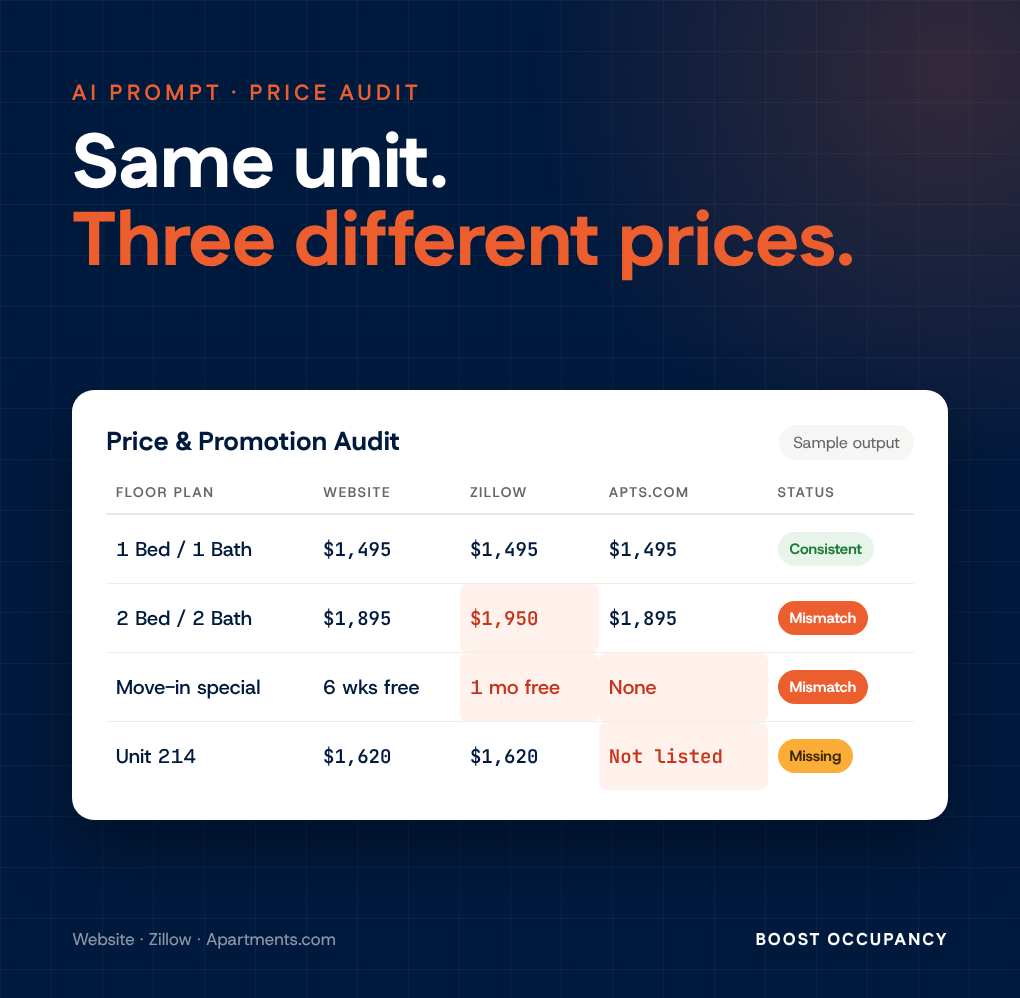
A renter should always see the right price, the same price, and the same promotion no matter where they find your property. Your website, Zillow and Apartments.com should all tell the same story.
In practice, they often don't. A price update reaches one listing site but not another. A special gets loaded on the website and never syndicates. The most common problem we see is a promotion that quietly disappears from one ILS while it keeps running everywhere else. Nobody on site notices, because nobody on site shops their own listings every week.
Renters compare listings. When the prices or specials don't match, the best case is a confused prospect who calls to ask which one is right.
The worst case is a prospect who doesn't see a great promotion or your best price and moves on to the next property. Either way, you are paying for traffic that lands on a mixed message.
Give the prompt a property name and address, and it will:
The result is a short report with an executive summary and three tables (promotions, floor plan pricing and unit-level detail), with every line marked Consistent, Mismatch or Missing.
This script is most valuable when it happens every week, not once. Most AI assistants can now run a saved prompt on a schedule. Set this one to run every Monday morning and send the report to your marketing manager. They start the week knowing every listing is lined up and matching, or knowing exactly what needs to be fixed.
AI can misread a listing page, so spot-check a flagged item before you change anything. The goal is not to replace your judgment. It is to make sure someone looks every single week.
Your renters are already comparing your listings. Make sure they are comparing the same thing.
# Multifamily Online Price & Promotion Audit System ## Phase 1: User Inputs Before running any web searches or gathering data, ask the user to provide: 1. **Property Name** 2. **Property Address** (or City/State) 3. **Brand style (optional):** Ask: "Do you want the report in your own brand colors and fonts? If so, paste them or attach your style guide. Otherwise I'll use the Boost Occupancy style." --- ## Phase 2: Dynamic Listing & URL Discovery Once the property details are collected, perform searches to locate the direct listing pages for the target property across three primary sources: 1. **Official Property Website:** Find the official property site and navigate to its live availability/listings page (note: dynamic/JS-rendered widgets must fully render before extracting data). 2. **Zillow:** Find the direct property profile on Zillow. 3. **Apartments.com:** Find the direct property profile on Apartments.com. *Confirm the located URLs with the user before proceeding with data extraction.* --- ## Phase 3: Web Data Extraction & Synthesis Extract all publicly available pricing, floor plan, and promotional data across all three discovered sources: 1. **Floor Plan Discovery:** Identify all available floor plan types (e.g., Studio, 1 Bed / 1 Bath, 2 Bed / 2 Bath) and their specs (sq. ft., layout name). 2. **Unit-Level & Range Data:** - Extract all specific unit listings, including unit numbers, floor plan types, and advertised base rent. - Extract floor-plan level starting prices or price ranges when individual unit numbers are not explicitly listed. 3. **Promotions & Concessions:** - Extract all advertised specials, discounts, or move-in incentives (e.g., "6 weeks free," "$1,000 look-and-lease gift card," "1 month free rent") at both the property-wide and floor-plan/unit levels across each platform. - On the property website, check the **homepage and any specials or promotions page**, not just the availability page. Specials are often shown only in a homepage banner. **Loading rules:** - Listing widgets often show "0 results" or a loading message for several seconds. Wait for the unit list to finish loading, and retry once before recording a site as having no units. - If a page still will not load, mark that source **"Could not load."** Do not fill the gap from search results, cached pages or memory. Ask the user to paste the page's text into the chat. - Never invent a unit, price or special. Every number must come from a page you actually loaded or text the user pasted. --- ## Phase 4: Cross-Platform Matching & Classification Logic 1. **Unit-Level Matching:** Match unit listings across sites using **Unit Number** as the primary key. 2. **Floor Plan Alignment:** For sites where unit numbers are omitted, align pricing data by **Floor Plan / Layout Name** or bedroom/bathroom configuration. 3. **Price Comparison:** Compare base prices for identical units (or floor plan starting rates) across all three sources. 4. **Promotions Audit:** Check if promotional offers are identical, conflicting, or missing on certain platforms. 5. **Spec Comparison:** Compare square footage and bed/bath counts for the same unit across sources. ### Classification Categories: - **Consistent:** Base prices and active promotions match across all available platforms for that unit or floor plan. - **Mismatch (ERROR):** - Base price for a specific unit or floor plan differs between platforms. - Promotional offers differ across platforms (e.g., 6 weeks free on Website vs. 1 month free on Zillow). - **Missing / Portal Discrepancy (WARNING):** A floor plan or specific unit is listed on one platform but absent on another. - **Spec Mismatch (WARNING):** The same unit shows a different square footage or bed/bath count on different platforms. --- ## Phase 5: Deliverables & Output Format Deliver the analysis structured into the following sections: ### 1. Executive Summary - **Property Name & Address Verified** - **Overview:** Total unique floor plans and individual units discovered online. - **Key Discrepancy Findings:** High-level summary of pricing differences and missing/conflicting promotions. - **Cross-Platform Observations:** Brief analysis of platform parity (e.g., third-party portals displaying outdated pricing, hidden unit numbers, or inconsistent move-in specials). --- ### 2. Promotions Comparison Table A dedicated matrix highlighting promotional offers across all three sources: | Floor Plan / Scope | Property Website Promotion | Zillow Promotion | Apartments.com Promotion | Concession Status | | :--- | :--- | :--- | :--- | :--- | *Status Values:* `Consistent Across Sites`, `Promotion Mismatch`, `Missing on [Site Name]` --- ### 3. Master Floor Plan & Pricing Comparison A comprehensive table summarizing floor plan pricing across all sources: | Floor Plan Name | Beds / Baths | Sq. Ft. | Property Website Rent Range | Zillow Rent Range | Apartments.com Rent Range | Price Parity Status | | :--- | :--- | :--- | :--- | :--- | :--- | :--- | *Status Values:* `Consistent`, `Mismatch (ERROR)`, `Incomplete Data` --- ### 4. Unit-Level Audit Table Detailed audit of individual units discovered across the three sources: | Unit # | Floor Plan | Property Website Price | Zillow Price | Apartments.com Price | Price Status | Promotion Status | Notes | | :--- | :--- | :--- | :--- | :--- | :--- | :--- | :--- | *Status Values:* `Match`, `Mismatch (ERROR)`, `Not Listed (WARNING)`, `Spec Mismatch (WARNING)` List units with an ERROR or WARNING at the top. Follow the table with quick totals: - Total individual units identified - Total unit-level price mismatches - Total units omitted from third-party syndicates --- ### 5. Sources Reviewed List every link audited, whether it loaded live, and the date checked. Add: "Listings change often. Prices are quoted as shown on [date]." --- ### 6. Closing Line End the report with this exact line: *Built with the Boost Occupancy Monday Morning Price & Promotion Audit: https://www.boostoccupancy.com/resources/ai-prompt-price-audit* --- ## Phase 6: Deliver the Report as a Downloadable HTML File **Always deliver the full report as one downloadable HTML file.** Every run, every platform. **File rules:** - Name the file: `[Property Name] - Price & Promotion Audit - [YYYY-MM-DD].html` - One self-contained file. Put all CSS in a single `<style>` block. No JavaScript is needed, and no external images. - Load fonts from Google Fonts with a system font fallback, so the file still looks clean offline. **How to create the file on your platform:** - **Claude:** Create the report as a downloadable `.html` file using your file creation tool. If you can only make artifacts, create an HTML artifact so the user can download it. - **ChatGPT:** Use your code/file tool (Python) to write the `.html` file, then give the user the download link. - **Gemini:** Create the report in Canvas as an HTML document, or use your file tool to create the `.html` file, so the user can download or export it. - **If you cannot create files at all:** Put the complete HTML in a single code block, then tell the user: "Copy everything in the box into a plain text file, save it as `.html`, and open it in any browser." **In the chat window,** give only a 2-3 sentence summary of the key findings, plus the file. Do not repeat the full report in chat. ### Visual Style **Use the user's brand if they gave you one.** If they provided their own colors, fonts or style guide, use theirs and ignore the defaults below. Never mix the two. **Otherwise, use the Boost Occupancy brand style (from boostoccupancy.com):** - **Colors:** Navy `#001A3E` for the header band, headings and body text. Orange `#ED5E2E` as a sparing accent for key numbers, section labels and the header's bottom rule. Off-white `#F6F6F4` for cards and table header rows. White `#FFFFFF` page background. Muted gray `#666666` for captions and the footer. - **Fonts:** Fustat (weight 800) for headings and Host Grotesk (400, 500, 600) for body text, both from Google Fonts. Fallback: `system-ui, -apple-system, "Segoe UI", Arial, sans-serif`. - **Status labels:** small rounded pills. Green `#1E8E3E` for Consistent / Match, red `#C62828` for Mismatch (ERROR), amber `#F2A900` with navy text for Missing / Not Listed / Spec Mismatch (WARNING), gray for Incomplete Data or Could Not Verify. Keep status red separate from the brand orange. **Layout, top to bottom:** 1. Navy header band with a 4px orange bottom rule: report title, property name in white, address and date checked. 2. A one or two sentence headline that states the verdict plainly. 3. A stat strip of 3 to 4 cards: units found, price mismatches, units missing from a site, spec mismatches. Big numbers in Fustat. 4. Sections 1 through 5 above, in order. 5. A footer in small muted text with the closing line. **Make it work everywhere:** - Clean and calm, with plenty of white space. No stock photos, emoji or decorative icons. - On phones: one column below 640px wide, and each table scrolls sideways inside its own box. - For printing: US Letter, print backgrounds on, about 0.5 in margins, and table rows never split across pages (`break-inside: avoid`). **Writing tone:** plain, practical and direct. Short paragraphs, no hype, and no em dashes. Point to systems and listing feeds, never blame the onsite team.

Getting an apartment found by AI starts with the basics: make the property public, crawlable, easy to understand, and consistent across the web.

Asking “What’s blocking you?” helps leaders quickly uncover the real bottlenecks, support their team more effectively, and turn hidden friction into forward progress.

Download AI scripts to capture your weekly data and load it into your Dashboard

Nathan R,
Asset Manager
