
Make sure renters see the same price and the same special everywhere, with a weekly AI audit of your website, Zillow and Apartments.com.

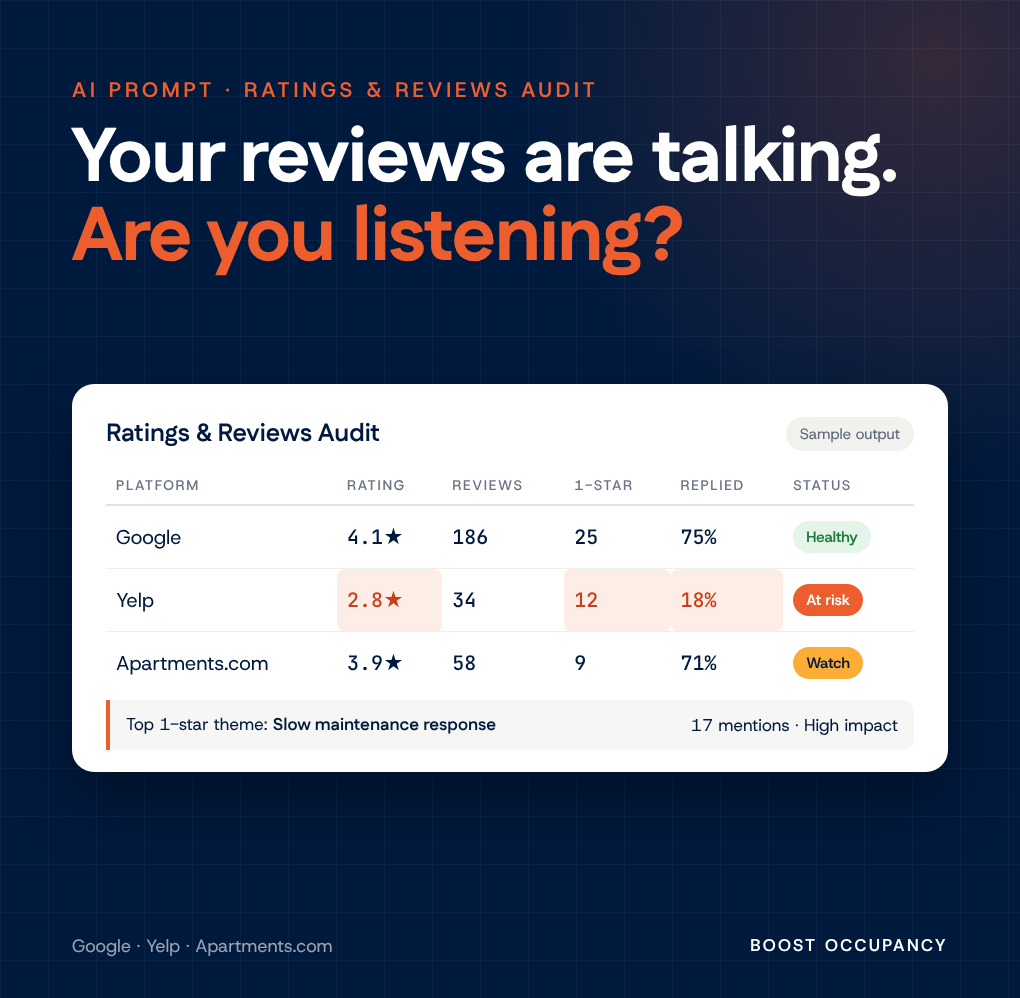
Before a prospect ever calls, they scroll to your reviews. A stranger who used to live in your building gets the first word with your next resident, and it never shows up in your leasing report.
Most teams read reviews one at a time, as they come in, usually to write a reply. That is the hardest way to learn from them. One review is an anecdote. Twenty read side by side are a diagnosis.
Reviews come from strong emotion, and the angry ones are the most useful. A 1-star review is a resident telling you, for free and in public, exactly where your operation broke.
When you line them up, the complaints almost always cluster into a short list of controllable problems: slow maintenance, calls that never get returned, lost packages, surprise move-out charges. You can't un-write a review. You can fix the thing that keeps writing them.
Give the prompt a property name and address, and it will:
The result is a branded report you can share with your team or your owner. Every quote is verbatim and attributed, and a Limitations section says plainly what the audit could and could not capture.
Point the same prompt at your closest competitor. Their reviews are wide open. Who has the better rating? What are their residents upset about, and are you making the same mistake? What are they praised for that you should be matching?
Their 1-star reviews are a map of the promises they're not keeping. Every one of those is an opening for you.
We suggest running it a few times a year, for your property and your closest competitor. AI can misread a page, so check a quote before you act on it.
Your renters are already reading your reviews. Beat them to it.
Coming soon
Want to know when we release new AI prompts? Fill out our contact form and we'll let you know when the Boost Occupancy AI Prompt Library launches.
Notify Me# Ratings & Reviews Audit Prompt **How to use:** Paste this entire prompt into a new conversation with Claude (e.g., followed by "Run the Ratings & Reviews Audit for [property name], [address]"). It is fully self-contained — no other file, memory, or prior conversation is required. Claude should follow the instructions below exactly, starting with Step 0, produce the Markdown report in the Output Format section, then build a polished deliverable per one of the two design specs below — unless the user says they only want the Markdown: - **HTML Report Design Spec (default)** — a single-page, Boost-Occupancy-branded, responsive HTML report. Prefer this whenever the report will be shared with others, viewed on more than one device, or just needs to look sharp and be easy to skim — it needs no re-gathering of data if a Markdown report already exists. - **Word Document Design Spec** — a traditional paginated .docx. Use this instead only when the user specifically needs an editable Word file or a printed handout. If the desired format isn't clear from context, ask once before building. ### Prerequisites This prompt requires an environment with: - **Browser access** capable of navigating to URLs, reading page text/DOM, and running small JavaScript snippets against the page (e.g., Claude's Chrome browser integration). This is used to visit each review platform and extract review data. - **Code execution** capable of running Node.js with the `docx` npm package (install it if not already present), for building the Word document, plus a way to convert the result to PDF/images for a visual QA pass before delivery. - **A brief moment of human interaction for the Google Maps step specifically.** Google Maps' review pagination is gated behind an anti-automation check (see Known Platform Behaviors below) that blocks programmatic scrolling from loading more than the first batch of reviews. The only reliable workaround found is to have the actual user scroll the reviews panel themselves for a minute or two. Yelp and Apartments.com are fully automatable and need no pause. If this is a fully unattended/headless run with no user available to scroll, say so up front and either skip full Google pagination (falling back to the always-available aggregate rating/breakdown/tags) or proceed with whatever the first automated batch yields — do not fabricate a workaround. If either capability is unavailable in the current environment, say so up front, do as much of the audit as is possible with what's available (e.g., Markdown report only, or manual-lookup guidance for the user), and note the gap explicitly rather than guessing at review content. --- ## Inputs Required - **Property name** - **Property address** (street, city, state, zip) If not provided, ask for both before starting. Do not guess or substitute a nearby/similarly-named property. ## Objective Produce a factual, verbatim-quote-backed audit of a property's public ratings and reviews across the platforms below, surface the recurring themes behind negative reviews (especially 1-star), and recommend concrete, prioritized actions — all without fabricating, paraphrasing-as-quoting, or inflating any data point. ## Platforms to Check 1. Google (Maps/Business Profile) 2. Yelp 3. Apartments.com (If the property is on other major platforms the user mentions — e.g., ApartmentRatings.com, ApartmentList — include them using the same methodology; note in Limitations if a platform wasn't checked.) --- ## Known Platform Behaviors & Efficiency Notes Read this section before starting Step 1. It documents platform-specific quirks discovered during live runs, so they don't have to be rediscovered (and don't burn tool calls) each time. ### Google Maps - **Automated pagination is blocked at the platform level, not just hard to trigger.** Confirmed via network-request inspection: loading the reviews panel fires a `waa-pa.clients6.google.com` "Ping" call (Google's Web Application Attestation / bot-detection check). Beyond the initial ~10 "most relevant" reviews, no further network request for additional review pages ever fires when scrolling is driven programmatically — not via `element.scrollTop` assignment, not via synthetic `WheelEvent` dispatch, and not via CDP-level trusted mouse-wheel events through the browser-automation tool's own scroll action. The scroll position visually moves and a loading skeleton placeholder even appears at the bottom of the list, but the actual data fetch never completes. Do not spend more than one quick check confirming this — treat it as a known, session-level block, not a solvable puzzle. - **The reliable fix: have the actual user scroll.** This only works because Claude's Chrome integration drives the person's real browser — a genuine, human-originated scroll (the user's own mouse/trackpad, not Claude clicking or scrolling on their behalf) is not subject to the same block and reliably loads every subsequent page of reviews. 1. Navigate to the property's Google Maps listing and click into the Reviews tab. 2. Capture the aggregate rating, total review count, full star-level breakdown, and auto-generated topic tags immediately — these render without any pagination and are the highest-value data on this platform. 3. Tell the user plainly: automated scrolling is blocked by Google, so they'll need to manually scroll through the reviews list themselves (in the same tab Claude just opened) until they reach the bottom or as far back as the audit needs (e.g., "the last two years" — since Google sorts by "most relevant" rather than date, reviews from the target window are scattered throughout the full list, not clustered at the top, so scrolling has to go close to the very end for good coverage). Ask them to also click any "... More" links on long reviews as they pass them, though Claude can also click these programmatically later (see below) if some are missed. 4. **Pause and wait for the user to say they're done** (or to check in partway) rather than guessing at timing. 5. While waiting (or once told to continue), periodically run a JS extraction pass — do not wait until the very end to extract, because Google virtualizes the review list (it only keeps roughly 10-20 review cards in the DOM at a time, unmounting earlier ones as the user scrolls past them). A single extraction pass after the user finishes will only see whatever is rendered at that final scroll position, silently losing everything scrolled past earlier. Instead: - Maintain a JS accumulator across calls: `window.__reviews = window.__reviews || {}`. - Each pass: click any visible "expand" buttons for truncated review text (Google renders these as a `button` whose visible text is exactly `"More"` — select generically by matching `button` elements with that text rather than hardcoding a specific CSS class, since Google's obfuscated class names can drift between sessions), then read each currently-rendered review card and upsert it into `window.__reviews`, keyed by something stable like `name + '|' + date + '|' + first ~40 chars of the review body` (dedupe key — the same card will be seen and re-extracted multiple times as it stays in view across passes, which is fine). - Run this extraction pass every so often during the pause (e.g., after telling the user to go ahead, check back a few times) and once more right after the user confirms they've reached the end. 6. Confirm completion by comparing `Object.keys(window.__reviews).length` against the total review count captured in step 2 — if they match (or are close, accounting for a few reviews with no text and no distinguishing content), extraction is complete. - **Extracting individual review fields:** identify the DOM structure once by inspecting a sample review card (structure can drift over time, so verify rather than assuming), then extract in a single combined JS pass per card: - Star rating: not present in extracted plain text — it's encoded as an `aria-label` ending in `"star"`/`"stars"` (e.g., `"5 stars"`) on an element inside the card. Select via an attribute-suffix match (e.g., `[aria-label$="stars"], [aria-label$="star"]`) scoped to the card, not a hardcoded class name. - Reviewer name, relative date, and review body are each in their own child element within the card; identify their (obfuscated) classes once via a quick inspection pass and reuse for the rest of the extraction — do not re-derive them every call. - If a card has an owner/management response, it typically shares the same class as the review body text but appears as a second match within the card — take the first match as the review, the second (if present) as the owner response. A review left with no text of its own may cause the owner response to be mistaken for the review body — treat an apparently owner-voiced "body" on a review with unusually short or missing reviewer text as a signal to double check, not a hard rule. - A handful of reviews may still show a trailing "…" even after clicking "More," if the click landed on a card just as it was being virtualized in/out. Mark these `[TRUNCATED]` in the output rather than presenting them as complete — don't burn extra scroll cycles chasing every last one. - **Retrieving the accumulated data back out of the browser is its own gotcha, but there's a fast path — try it first:** returning a large JSON blob directly from a JS execution call's return value gets silently truncated by that tool's transport at roughly 800-1000 characters — well short of what 30-150+ reviews' worth of text requires. However, a page-text-extraction tool (e.g., `get_page_text`), if the environment has one, typically has a much larger budget (tens of thousands of characters) because it's designed for reading articles, not tool return values. Exploit this: 1. In JS, `JSON.stringify` the full accumulated dataset, then inject it as plain text into the page itself — clear `document.body.innerHTML` and set it to a single `<pre>` element containing the JSON string (a full test run successfully retrieved all 84 reviews, ~39,000 characters, in one shot this way). 2. Call the page-text-extraction tool once and parse the JSON straight out of its output. 3. This is destructive to the live page (it wipes the DOM), so do it only after extraction into `window.__reviews`/equivalent is confirmed complete, and only if the page isn't needed for anything else afterward (e.g., no further scrolling or expand-button clicking planned). 4. If no such tool exists in the environment, or the dataset is too large even for its budget, fall back to manual chunking: greedily pack the accumulated reviews into an array of chunks kept under ~800 JSON-stringified characters each (computed in JS, not guessed by hand), store on `window.__chunks`, and retrieve `JSON.stringify(window.__chunks[i])` one at a time, assembling the full dataset across calls. 5. This same output-size limit (and the same two-tier fix) applies to any platform, not just Google — reuse it wherever a JS extraction pass would return more than roughly a dozen reviews' worth of text at once. 6. **Save the retrieved dataset to disk immediately**, before navigating the tab to the next platform or doing anything else — a page navigation (even "back") does not reliably restore in-page JS state (`window.__reviews` etc.), so data not yet saved outside the browser can be lost. (Browser back/forward-cache sometimes preserves it, but don't rely on that.) - If, despite the above, the user is unavailable to scroll (fully unattended run) or pagination still doesn't yield useful additional reviews after a genuine human scroll attempt, document this explicitly in the Limitations section rather than presenting Google's contribution as complete. In that fallback case, the aggregate rating, total count, star breakdown, and topic tags (step 2 above) are still reliably available without any scrolling and should always be captured regardless. ### Yelp - **Use the `?start=N` URL query parameter to paginate** (N = 0, 10, 20, 30... in increments of 10; 10 reviews per page). This is fast and reliable — do not attempt to click an in-page "Next" control first. - Yelp separately discloses reviews it has filtered out of the public star rating at a distinct URL: `https://www.yelp.com/not_recommended_reviews/<business-slug>`. **Always check this URL too** — these reviews are real, often substantive (and frequently negative), and should be captured and reported in their own clearly-labeled subsection, distinct from the reviews counted in the official rating. Note in the summary table how many exist and what fraction are 1-star. - On first load, Yelp's review list sometimes appears empty/truncated in extracted text. If so, scroll down further and re-extract — this reliably resolves it. - Occasionally a review's text has been removed by Yelp for a Terms of Service violation; note this as "text removed by Yelp, not available" rather than skipping the review silently. ### Star ratings (Google and Yelp) - Star ratings are **not present in extracted plain text** — text-extraction tools strip them. They are encoded as `aria-label`/`alt` attributes (e.g., `"1 star rating"`). - Extract them via a JS/DOM query for `[aria-label$="star rating"]` (or the platform's equivalent attribute), then correlate each match to its parent review container (by DOM order/nearest ancestor) to associate it with the correct reviewer, date, and text. Do this **once per platform, in a single pass** (per scroll/pagination step for Google, given the virtualization behavior above), rather than per-review lookups. ### Apartments.com - Listings that are **"not currently advertising"** typically render no reviews/ratings UI at all — only a hidden review-submission form scaffold. This is a listing-status artifact, not necessarily an absence of reviews on Apartments.com generally. - Before concluding no reviews exist, confirm via a quick DOM/JS inspection (e.g., `document.body.innerText`) rather than relying on a guessed `/reviews/` URL — guessed URLs for this platform have 404'd in practice. - If the listing is bot-challenge-gated on first load, wait a few seconds and retry the text extraction before concluding the page is broken. ### General efficiency notes - Prefer URL-parameter pagination or direct navigation over simulated UI interaction whenever a platform supports it (confirmed for Yelp; check whether other platforms expose an equivalent before falling back to UI automation). Google Maps is the known exception — its pagination requires genuine human-driven scrolling, not URL parameters or UI automation (see above). - Do a single combined pass per platform to collect reviewer name, date, star rating, full text, and owner response together, rather than separate passes per field. - Set an explicit attempt cap (2 methods) for any interaction that isn't working after the first try, and move on — document the limitation instead of troubleshooting indefinitely. - Any JS extraction step expected to return more than a dozen or so reviews' worth of text in one call should use the chunked-retrieval technique described under Google Maps above — the ~800-1000 character return-value truncation is a tool-level limit, not a Google-specific one. --- ## Step-by-Step Instructions **Step 0 — Confirm inputs.** Verify property name and address are provided. Ask if missing. **Step 1 — Google.** 1. Navigate to the property's Google Maps/Business listing and open the Reviews tab. 2. Capture the aggregate rating, total review count, and full star-level breakdown immediately (these don't require pagination), plus any auto-generated review-topic tags. 3. Tell the user that Google blocks automated review pagination and ask them to manually scroll the reviews list themselves — as far as needed for the audit's date range, since Google sorts by relevance rather than date — expanding any truncated "... More" reviews as they go. Pause and wait for them to confirm they're done (checking in periodically is fine). 4. While waiting and once confirmed done, run the periodic JS accumulation + chunked-retrieval technique described in Known Platform Behaviors above to extract reviewer name, date, star rating (via `aria-label`), full text, and owner response for every review — without this, only the initial ~10 reviews would be captured. 5. If no user is available to scroll (unattended run), skip to reporting only the aggregate rating/breakdown/tags and note the gap in Limitations. **Step 2 — Yelp.** Navigate to the property's Yelp business page. Paginate all "Recommended" reviews via `?start=N` (10 per page) until exhausted. Separately navigate to `https://www.yelp.com/not_recommended_reviews/<business-slug>` and capture those reviews too, clearly labeled as excluded from the public rating. For each review captured on both pages, record reviewer name, date, star rating (via `aria-label` extraction), full text, and any owner/management response. **Step 3 — Apartments.com.** Navigate to the property's Apartments.com listing. If no reviews/ratings module renders, confirm via DOM inspection whether this is a "not currently advertising" status artifact before concluding no data exists. If a reviews module exists, capture the same fields as above. **Step 4 — Check for duplicate/copy-paste reviews.** Before finalizing counts, scan captured reviews for near-identical or copy-paste text (e.g., the same complaint posted by two different reviewer names, or a reviewer's own review reposted). Flag these explicitly rather than silently double-counting them as two independent data points — note the overlap in the Limitations section if it affects theme-frequency counts. **Step 5 — Cross-platform identity check.** Confirm all platforms refer to the same property (matching address, phone number, management company/branding) before combining any data across them. **Step 6 — Identify themes.** Group 1-star (and other negative) reviews into recurring theme buckets (e.g., billing disputes, maintenance delays, pest/mold issues, staff conduct). For each theme, count mentions, and assess Impact (High/Medium/Low, based on severity and frequency) and Fixability (Easy/Moderate/Hard, based on whether the fix is operational/policy vs. capital/structural). **Step 7 — Identify positive themes.** Separately capture what's working well — repeated praise (location, specific staff members by name, amenities, leasing experience, etc.) — these are useful context and often reveal a "sales experience vs. resident experience" gap worth calling out in Key Insights. **Step 8 — Synthesize and prioritize.** Write Key Insights (patterns across platforms, notable trends over time, the highest-leverage issue and why) and a prioritized Top Priority Actions list (aim for 4-6 concrete, specific actions, each tied back to the theme(s) it addresses). **Step 9 — Build the Markdown report**, then the polished deliverable — the HTML report by default, or the Word document if the user specifically wants one — using the templates/specs below. --- ## Output Format (Markdown) ``` # [Property Name] — Ratings & Reviews Audit [Address] | Data captured [Date] ## Summary Across Platforms | Platform | Overall Rating | Total Reviews | 5★ | 4★ | 3★ | 2★ | 1★ | Owner Responses | |---|---|---|---|---|---|---|---|---| ... | **Combined (platforms with usable data)** | — | ... | ... | ... | ... | ... | ... | — | [1-2 sentence identity-confirmation note: management company, any listing-status caveats.] ## Positive Themes (What's Working) - Bullet list, most-cited first. ## 1-Star Deep Dive ### [Theme Name] — N mentions | Impact: [level] | Fixability: [level] [1-2 sentence description] > "verbatim quote" — Reviewer, Platform, Date > "verbatim quote" — Reviewer, Platform, Date [repeat for each theme, most-mentioned first] ## Key Insights [2-4 paragraphs synthesizing cross-platform patterns, trends over time, and the single highest-leverage issue.] ## Top Priority Actions 1. **[Action]** — [rationale, tied to specific theme(s)] ... ## Appendix: All 1-Star Reviews (Verbatim) ### [Platform 1] (...) [table or list of every 1-star review captured: Reviewer | Date | Text | Owner Response] ### [Platform 2] — "Not Currently Recommended" / excluded reviews (if applicable) [same format, clearly labeled as excluded from the public rating] ## Limitations of This Audit - [Any platform where full data wasn't accessible, and why — be specific about what was and wasn't captured.] - [Duplicate/copy-paste reviews noted, if any.] - [Owner-response counts are approximate/observed, not independently verified against platform reporting.] - No quotes in this report were fabricated; every verbatim quote is attributed to the platform, reviewer name as displayed, and date shown at time of capture. ``` ## Notes / Limitations to Flag Always include a Limitations section. Be specific and honest about: - Any platform or subset of reviews that could not be fully accessed (name the platform, what was tried, what was captured instead). For Google specifically: whether a user was available to manually scroll, and how far the scrolling reached. - Any listing-status caveats (e.g., "not currently advertising") that may explain missing data. - Duplicate or near-identical reviews and how they were handled in counts. - Any approximated figures (e.g., owner-response rates) and why they're approximate. Never fabricate a quote, reviewer name, date, or star rating to fill a gap. An honest "not accessible" beats a plausible-looking guess. --- ## HTML Report Design Spec — Boost Occupancy Brand (Default Deliverable) **Build this as a single self-contained HTML file** (all CSS in a `<style>` block, no build tooling), generated from a script that reads the same structured audit data used for the Markdown report — don't hand-write or hand-edit the HTML per run; regenerate it from data (theme lists, quotes, tables) so the report never drifts from what was actually captured. This spec is Boost Occupancy's brand system, sourced from the company's Creative Brief template (colors, type roles, and several component patterns are reused directly from it). If building for a different brand, ask for that brand's palette/fonts and substitute them into the structure below rather than guessing. Unlike the two-page print brief this palette comes from, this report is a **single long, responsive page** — accuracy and shareability matter more than a fixed page count here, since this is meant to be read on any device and shared as a link, not printed. ### Color Palette (CSS custom properties — design both themes) Light mode (bare `:root`, the light defaults): - `--navy: #001A3E` / `--navy-2: #062A55` — hero band, sticky nav bar, footer, action-card fills - `--accent: #ED5E2E` — section labels, chip-high, callout borders/titles, action-card numbers - `--gold: #FCAD38` — sparing secondary accent (hero rule, small highlights only) - `--surface: #F6F6F4` / `--surface-2: #EDEDE9` — quote box and table-row backgrounds - `--bg: #FFFFFF`, `--text: #1A1A1A`, `--border: #E2E2DE` - `--muted: #666666` / `--muted-2: #999999` — captions, metadata, footer text - Plus chip-specific tokens for impact/fixability badges (e.g., a high-impact red-leaning chip, a medium amber chip, a "flag/excluded" neutral chip) — pick hues that read clearly against `--surface` in both themes, not just borrowed from the accent. Dark mode overrides (redefine the same token names only, never invent new ones): `--navy: #06264F`, `--accent: #FF7A4A`, `--bg: #0A0F1C`, `--text: #ECEFF7`, plus corresponding lifts for `--surface`/`--border`/`--muted` so contrast holds. Structure the CSS exactly as the artifact-design fundamentals specify: the bare `:root` block carries the full light palette, `@media (prefers-color-scheme: dark) { :root:not([data-theme="light"]) { ... } }` redefines the same tokens, and `:root[data-theme="dark"] { ... }` redefines them again so an explicit in-app theme toggle wins in both directions. Every component pulls color from these tokens — never a literal hex baked into a component rule — or the report renders wrong under one theme. ### Typography - **Archivo** (weights 600/700/800) for the hero title, section titles, theme headings, and action-card numbers — the display/heading role. - **Public Sans** (weights 400/500/600/700, italic 400) for body copy, table cells, quotes, and captions. - Load both from Google Fonts via a `<link>` tag (the only external font host the Artifact CSP allows); give each a real fallback stack (e.g., `Georgia, serif` / `Arial, sans-serif`) rather than none. ### Layout & Structure - **Hero band**: full-bleed navy strip with the property name, address, and "Data captured [date]," a thin gold or accent bottom border. - **Sticky anchor nav**: a navy-2 bar directly under the hero with in-page jump links to each major section (Summary, Positive Themes, 1-Star Deep Dive, Key Insights, Actions, Appendix, Limitations) — genuinely useful on a long single-page report, unlike a Word ToC. - **Content column**: `.wrap { max-width: 900px }`, centered, generous vertical rhythm between sections; a side gutter of at least 16px at every width per the standard responsive rules. - **Section pattern**: an uppercase `.section-label` (small, accent-colored, letter-spaced) above each `.title` heading — this is the one repeating structural element that ties every section together, mirroring the Creative Brief's section-label convention. - **Mobile breakpoint** at `max-width: 640px`: stack any multi-column rows to one column, and let tables scroll horizontally in their own `overflow-x: auto` container rather than shrinking illegibly. ### Component Patterns (reused from the Creative Brief's brand system) - **Chips** (`.chip`, `.chip-high`, `.chip-med`, `.chip-flag`) — small rounded badges for Impact/Fixability levels and for flagging excluded/not-recommended reviews, reusing the brief's tag-chip pattern. - **Quote box** (`blockquote.quote`) — `--surface` background, left border in `--accent`, italic quote text, uppercase attribution line below (reviewer, platform, date) — the brief's Quote Box pattern applied to verbatim reviews. - **Callout** — for the Key Insight and Top Recommendation moments, same visual role as the Word doc's callout: `--surface` fill, left accent border, bold accent-colored title line. - **Action cards** (`.action-card` / `.action-num`) — the brief's Deliverables Strip pattern reused for Top Priority Actions: navy cards in a row (stacking on mobile), each with a large orange number and the action text. - **Appendix tables** — wrap each platform's verbatim review table in `<details class="platform-block" open>` so the page loads with everything visible (per the "show the page at rest" rule) but a reader can still collapse long tables they don't need. - **Footer** — thin top border, navy band, business name + location on the left, report metadata (date captured, platforms checked) on the right. Only include contact details (phone, email, address) that are independently verified for the business being profiled in the footer — never invent or assume them; a verified name/location alone is fine to show without a fabricated phone number next to it. ### Page Flow Order 1. Hero (property name, address, date captured) 2. Sticky anchor nav 3. Summary Across Platforms (table) 4. Positive Themes 5. 1-Star Deep Dive (theme cards: chips for mentions/impact/fixability, then quotes) 6. Key Insights (callout treatment) 7. Top Priority Actions (numbered action cards) 8. Appendix (collapsible per-platform verbatim tables, open by default) 9. Limitations 10. Footer ### Build / QA Workflow 1. Gather and structure the audit data exactly as for the Markdown report (see Step-by-Step Instructions) before writing any HTML/CSS — the HTML generator should consume the same theme/quote/table data structures, not a re-transcription of the Markdown. 2. Load the `artifact-design` skill's fundamentals before building (token-based theming structure, real typographic hierarchy, "show the page at rest") — treat this report with the same craft as any other polished artifact, even though the content is utilitarian. 3. **Known bug class — sticky headers hiding rows:** do not apply `position: sticky` to a `thead th` unless the table sits inside its own well-defined, fixed-height scrolling container. On a normal page where the whole document scrolls, a sticky table header can silently overlap and hide the first body row with no console error — this only surfaces in a screenshot, never in code review. If a sticky header is wanted, verify it specifically with a screenshot before shipping; otherwise leave `thead th` unpositioned. 4. **Known bug class — appendix/table filtering scope:** identical gotcha to the Word doc — a table or section titled for a specific subset (e.g., "1-2 star Yelp reviews") must actually be filtered to that subset in code, not just labeled that way; a generic "map over all reviews for this platform" is an easy off-by-scope bug. 5. **Verify visually before delivering:** take screenshots (e.g., via Playwright, headless Chromium) at a desktop width (~1280px) and a mobile width (~390px), plus one with `color_scheme='dark'` to confirm the dark-mode token overrides actually apply and stay legible. Do this once, fix what it shows, and stop — don't loop indefinitely re-screenshotting the same page. 6. If the environment can publish a shareable, persistent link for the page (an artifact/hosting tool), publish it in addition to delivering the raw HTML file — a report like this is exactly the kind of thing the user will want to reopen or share without re-running the whole audit. 7. Deliver the Markdown report and the HTML file (plus the shareable link, if published) together, each with a one-line caption — do not re-summarize the contents in chat when the files/page speak for themselves. --- ## Word Document Design Spec — Standard Business Report **Build this as a single standalone script, written fresh each run, using the `docx` npm package (Node.js) directly.** No reusable component library, template file, or brand kit is required or should be assumed — every element below is a native Word feature (heading styles, built-in numbered/bulleted lists, paragraph borders/shading, plain tables). Avoid custom nested-table visual systems (hand-drawn tiles, badges, bar charts) — they look polished but require a lot of bespoke code to get right and aren't necessary for a clear, professional report. If this environment has a docx-creation skill or reference guide available, consult it for any additional library-specific tips; otherwise the gotchas below are sufficient on their own. If the user wants a specific brand's colors/fonts applied, ask for the palette and substitute it into the spec below — otherwise use the neutral defaults given here. ### Color Palette (minimal, professional, single accent) - INK `#1A1A1A` — body text, table header fills - ACCENT `#B23A2F` (muted brick red) — used sparingly: heading rules, callout borders, 1-star emphasis. A different single accent is fine if the user has a preferred brand color — ask if none is specified and it matters to them. - LIGHT `#F2F2F2` — alternating table row shading, callout fill - WHITE `#FFFFFF` - GRAY `#666666` — captions, metadata, footnotes ### Typography - Calibri or Arial for both headings and body (near-universal availability — avoids missing-font fallback issues in Word/LibreOffice on the reader's machine). - Headings bold, body regular. Use Word's built-in `HeadingLevel.TITLE`, `HeadingLevel.HEADING_1/2/3` so the document has real semantic structure (enables navigation pane / TOC in Word). ### Structural Elements (all native `docx` primitives — no custom helpers needed) - **Title block** — `HeadingLevel.TITLE` paragraph with property name, a subtitle paragraph (address + "Data captured [date]") in gray italic, and a paragraph bottom border as a rule beneath it. - **Table of contents — skip it.** A `TableOfContents` field looks appealing for a long report, but it renders as a visibly blank section under headless LibreOffice conversion (used for the mandatory QA pass below) since nothing triggers a field-update pass; only opening the file in desktop Word and manually refreshing fields populates it. Shipping a doc with a blank ToC page fails QA, so leave it out entirely and rely on heading styles alone for navigation (Word's own Navigation Pane still works off them even with no in-document ToC). - **Summary table** (platform ratings, KPIs) — one plain bordered `Table`: header row shaded INK with white bold text, body rows with alternating WHITE/LIGHT shading. Use this same table style for the star-distribution breakdown and the appendix review tables — one consistent table style throughout, not multiple bespoke visual treatments. - **Callout / key insight** — a `Paragraph` with `shading: LIGHT` and a left `border` in ACCENT (`border: { left: { style: SINGLE, size: 24, color: ACCENT } }`), used for the 1-2 "Key Insight" / "Top Recommendation" moments — no nested tables required, paragraph-level shading and borders handle this natively. - **Quotes** — indented, italic `Paragraph` (use `indent: { left: 480 }`) with a thin left border in ACCENT, attribution on the following line in small gray caps. Same treatment for every quote; skip the decorative quote-mark glyph. - **Theme sections (1-star deep dive)** — `HEADING_2` for each theme name, a metadata line ("N mentions · Impact: High · Fixability: Moderate") in bold gray caps, a short description paragraph, then the quote paragraphs. - **Action list** — a native numbered list (`numbering` config with `LevelFormat.DECIMAL`, not a custom badge/tile), bold action title inline followed by the rationale in regular weight. - **Page numbers** — footer, centered, "Page X of Y" via `PageNumber.CURRENT`/`PageNumber.TOTAL_PAGES`. - **Running header** — property name + "Ratings & Reviews Audit," right-aligned, thin bottom border. ### Page Flow Order 1. Title block 2. Summary table (platform ratings + combined KPIs) 3. Positive themes (Heading 2, bullet list) 4. Callout — key insight 5. 1-star deep dive (Heading 2 per theme, most-mentioned first, with quotes) 6. Key Insights (prose, Heading 2) 7. Callout — top recommendation 8. Top Priority Actions (numbered list) 9. Appendix — full review tables (Heading 2 per platform/section) 10. Limitations (prose) ### Build / QA Workflow 1. Gather and structure all audit data (see Step-by-Step Instructions) before writing the docx script. 2. Write one script that builds `children[]` in the page-flow order above using plain `docx` primitives (`Paragraph`, `Table`, `TableRow`, `TableCell`, native `numbering`), per the gotchas below. 3. **US Letter page size must be set explicitly** (`width: 12240, height: 15840` DXA). 4. Tables need `columnWidths` **and** per-cell `width`, both in DXA (not `PERCENTAGE`). 5. Use `ShadingType.CLEAR`, never `SOLID` (SOLID renders black). 6. Never insert a literal `\n` inside text — use separate `Paragraph`s. 7. `PageBreak` must be wrapped inside a `Paragraph`. 8. Bulleted/numbered lists must use a `numbering` config with `LevelFormat.BULLET`/`DECIMAL` — never a literal `•` or `1.` typed into the text. 9. Word's default Heading styles render in stock blue — set `heading: HeadingLevel.X` for outline/TOC structure, but explicitly override the run's `color`/`bold`/`size` (e.g., INK, bold) rather than leaving the default color, or the report reads as an unstyled Word template instead of an intentional design. 10. **Every table needs its column widths (and each cell's own `width`) to sum to no more than the page's usable width** — US Letter at the margins above (1440 DXA each side) leaves 9360 DXA, not the full 12240. Column widths that sum past that run the table off the right edge of the page silently (no error, just a cut-off table in the rendered output) — always sum and check before running the build. 11. Filter appendix/table data precisely to what the section heading claims (e.g., an "All 1-Star Reviews" table must actually exclude any higher-star reviews) — a generic "map over all reviews for this platform" is an easy off-by-scope bug when only some of a platform's reviews are supposed to appear. 12. **Verify before delivering:** convert the .docx to PDF (e.g., LibreOffice: `soffice --headless --convert-to pdf`, or an environment-provided equivalent), then the PDF to page images (e.g., `pdftoppm -jpeg`), and visually inspect a representative sample of pages (title, summary table, a theme section, both a Google and a non-Google appendix table if both exist, the last page) before sending to the user — the table-width and appendix-filtering bugs above are exactly the kind of thing that looks fine in code but wrong on the page. If no PDF/image conversion tool is available in this environment, note that the document is unverified visually rather than skipping the caveat. 13. Deliver both the Markdown report and the Word document via file-share, each with a one-line caption — do not re-summarize the contents in chat when the files speak for themselves.
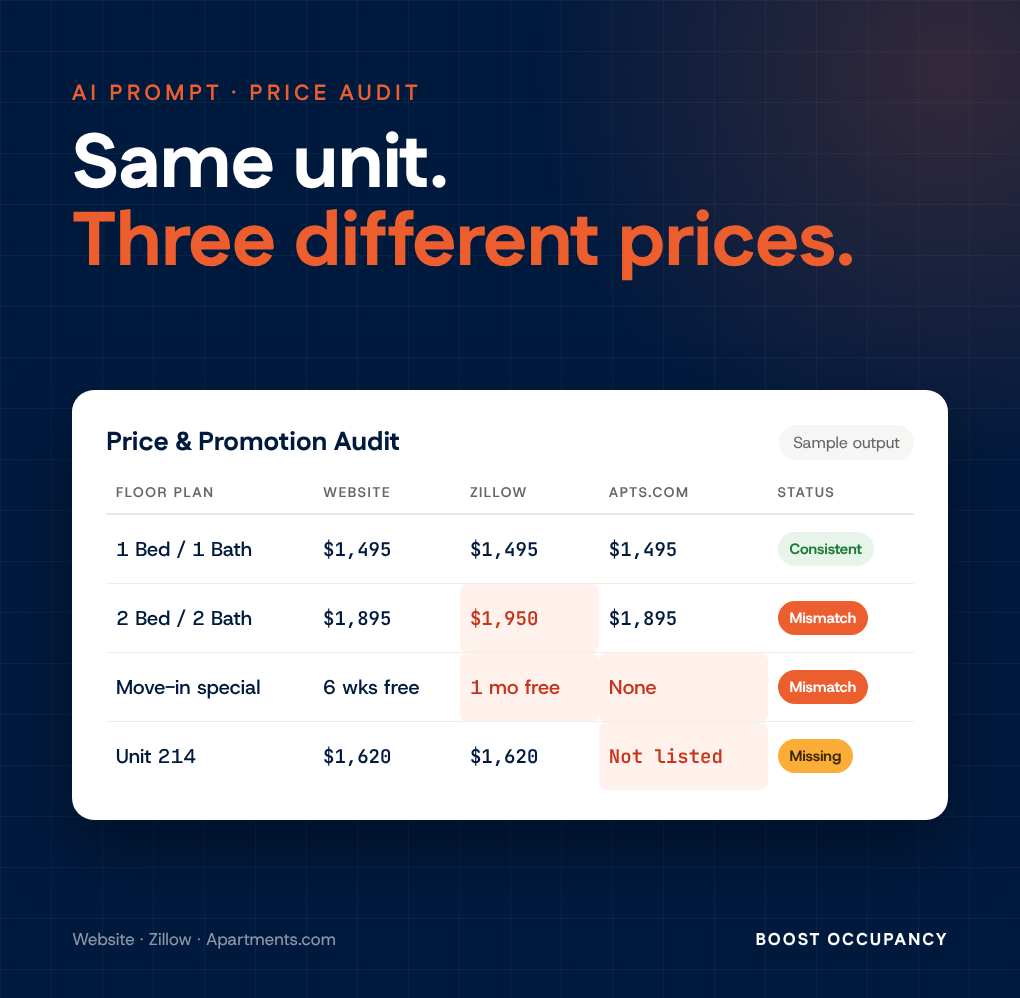
Make sure renters see the same price and the same special everywhere, with a weekly AI audit of your website, Zillow and Apartments.com.

Getting an apartment found by AI starts with the basics: make the property public, crawlable, easy to understand, and consistent across the web.

Asking “What’s blocking you?” helps leaders quickly uncover the real bottlenecks, support their team more effectively, and turn hidden friction into forward progress.

Nathan R,
Asset Manager
